United Kingdom · guide · 22 September 2026
Where to find the sealed planning decision notice on UK LPA portals: Idox, Civica, Northgate
You have the application reference. The register opens. You see dozens of PDFs — officer report, design and access statement, consultee responses — but not an obvious “decision notice”. The sealed grant is usually there under a predictable label, on a tab named differently on each vendor stack. This guide is portal literacy: where to click on Idox Public Access, Civica, and Northgate M3 PP, and how to tell the decision PDF from the recommendation pack. Not planning advice, not LPA contact harvesting, and not discharge drafting.
Why the sealed PDF matters
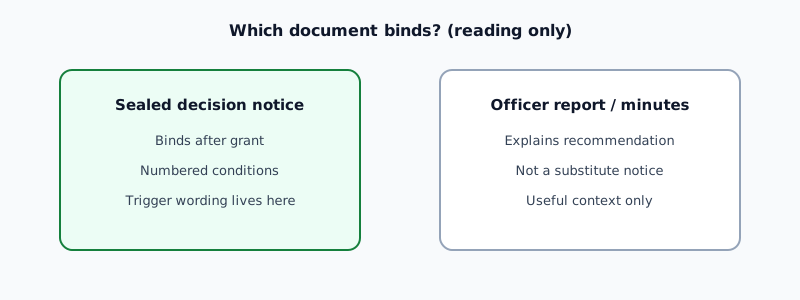
The officer report recommends. Committee minutes record the vote. The sealed decision notice is the grant — with the numbered conditions schedule that binds implementation. Programming, discharge, and funders should start from the issued notice, not the report draft. See decision notice vs officer report.
DecisionBrief’s £79 order flow asks you to name the application and paste the register URL. Finding the correct PDF first saves a round-trip — and avoids classifying conditions from the wrong document.
What to look for (any portal)
Document titles vary by authority, but the sealed grant usually includes one or more of:
- Decision Notice or Decision
- Grant of Planning Permission or Planning Permission Granted
- Approval Notice (especially on delegated approvals)
- Notice of Decision or Determination Notice
Check the date matches the decision date on the register summary. Open the PDF: the first page should state permission granted (or refused) and list numbered conditions — not “recommendation to committee”.
Idox Public Access
Idox is the most common UK public register shell. Typical path:
- Search by application reference or address → open the application record.
- Open the Documents tab (sometimes Related Documents).
- Sort by date descending — the decision PDF often appears on or just after the decision date.
- Filter mentally for Decision, Grant, or Approval in the filename. Ignore Officer Report, Committee Report, and Assessment unless you are cross-checking only.
- If conditions are split, some authorities post Decision Notice plus a separate Conditions Schedule — open both. See thin or missing sealed notice.
Idox tip: the officer report often has the largest file size and the word REPORT in the title. The decision notice is usually shorter and may include the council logo and “Town and Country Planning Act 1990” header text.
Civica planning portals
Civica-backed registers (several unitary and county councils) use a different skin but the same document-store idea:
- Open the application → View Documents or Documents.
- Look for a Decision category or document type filter.
- Titles may read Decision Notice, Planning Decision, or Formal Notice.
- Delegated approvals sometimes label the PDF Approval Notice — still the issued grant if it carries numbered conditions.
If only Committee Report and Minutes are visible, the sealed notice may not be uploaded yet — see below.
Northgate M3 PP
Northgate M3 Planning Portal (still live on several district registers):
- Open the application → Associated Documents or Documents.
- Scan for Decision Notice, Grant, or Permission.
- Northgate sometimes lists Decision as a document type in the table — sort by that column if available.
Bespoke and hybrid portals
Some cities run custom stacks (legacy back-office exports, combined planning/building-control registers). Habits that still work:
- Search the document list for
decision,determination,grant,approval. - Check both Planning and Decision folders if the UI splits them.
- Compare the register “Decision date” field to PDF upload dates — the sealed notice usually uploads on or within a few days of that date.
DecisionBrief follows what is published on the register you name. We do not maintain a live directory of every council’s portal vendor.
| System | Typical tab | Labels to open |
|---|---|---|
| Idox Public Access | Documents | Decision Notice, Grant of Planning Permission, Approval Notice |
| Civica | View Documents | Decision category, Formal Notice, Planning Decision |
| Northgate M3 PP | Associated Documents | Decision Notice, Grant, Permission |
| Bespoke | Varies | Search decision / determination / grant |
When the PDF will not open or is not there
Common register gaps:
- Broken PDF icon — file failed upload; try again later or request a copy from the authority through your usual professional channels.
- Officer report only — sealed notice not yet posted; do not programme from the report alone.
- Thin one-page grant — “Permission granted” without conditions; the full schedule may be a separate document. See thin or missing sealed decision notice.
- Committee decision pending issue — minutes show approval but no sealed PDF yet.
On the York Hempland sample, committee papers and the officer report opened; the sealed PDF did not. DecisionBrief cited what we could open and stamped the gap — the sample shows how we record that honestly on the £79 PDF.
From portal click to DecisionBrief order
- Find the sealed decision PDF (or note honestly if it is missing).
- Copy the register URL from your browser address bar.
- Order the £79 sourced reading — we quote numbered conditions from the sealed notice when we can open it.
We classify triggers (pre-commencement, during works, pre-occupation, compliance-only) on the notice we source — not on the officer report schedule alone.
What DecisionBrief does (and does not do)
What it is not
- Not planning advice. We do not interpret conditions beyond sourced quoting and timing classification.
- Not discharge drafting. We do not lodge applications.
- Not LPA contact harvesting. We do not scrape officer emails or market to planning departments.
£79 one-off · one named notice · PDF in 24 hours
Order a £79 sourced reading See the York sample first
Related guides
- Decision notice vs officer report — which document binds.
- Thin or missing sealed decision notice — when the PDF will not open.
- How to read condition timing — once you have the right PDF.
- Informatives vs numbered conditions — structure on the sealed notice.
Questions
Where is the decision notice on an Idox Public Access portal?
Open the application, go to the Documents tab, and filter or scroll for Decision Notice, Grant of Planning Permission, or Approval Notice. The sealed PDF often sits beside the officer report — read the filename and date, not the folder title alone.
Is the officer report the same as the sealed decision notice?
No. The officer report recommends; the sealed decision notice is the issued grant with numbered conditions. Always open the document titled Decision Notice or equivalent.
What if the decision PDF will not open or is missing from the portal?
Read what you can open — officer report, committee minutes — but do not treat them as the issued wording. The sealed notice may be posted later or under a different category. See the thin or missing notice guide.
Do Civica and Northgate portals use the same labels as Idox?
Similar purpose, different labels. Civica often uses View Documents with a Decision category. Northgate M3 PP uses Associated Documents with Decision Notice. Bespoke council portals vary.
Is this planning advice?
No. This guide is practical register navigation literacy. The council's sealed decision notice remains the legal document.
Portal labels change when authorities upgrade registers. This guide describes common Idox, Civica, and Northgate patterns as at September 2026. Last reviewed 22 September 2026. DecisionBrief is not a local planning authority.