United Kingdom · guide · 9 September 2026
When the sealed decision notice is thin, missing, or will not open
You go to the public register. The officer report is there. The committee minutes say "approved as recommended". But the decision-notice PDF will not load, or it opens as a one-page "Approved" stamp with no schedule, or the only conditions you can find are on the report. This guide is event-led literacy: which papers may still open, what does not bind, how to stamp the gap, and why DecisionBrief will not invent conditions from a notice we have not seen.
This page is informational. It is not planning advice, not discharge-application writing, and not a substitute for speaking to the local planning authority if their register will not serve the sealed notice. Public sector information on the York sample is reused under the Open Government Licence v3.0.
Which document binds: a reminder
The written decision notice issued to the applicant is the document that states the grant or refusal and the conditions as issued. GOV.UK guidance on determining a planning application (paragraphs 019–021) says the local planning authority must formally notify the applicant of their decision using a written decision notice, and that the decision date on the notice is the date the notice is issued. The officer report recommends. The committee minutes record the resolution. If the sealed notice later differs from the report the committee adopted, the sealed notice wins.
See decision notice vs officer report for the full hierarchy. The short version: until you have the sealed notice, you are reading a recommendation and a vote, not the issued wording.
Scenarios where the sealed notice is hard to read
1. The PDF will not open
Common blockers:
- Register requires a reCAPTCHA or login that a machine or script cannot pass
- Idox, Acolaid, or other planning-portal software serves a broken link or a timed-out session
- The register lists "Decision Notice" but the file is blank, corrupted, or password-protected
- Simple search works, but the decision PDF link returns a 404 or requires a paid environmental-search subscription
What to read instead: The officer report (if it lists the draft conditions in full), committee minutes (to see if the recommendation was adopted or amended), and any other published papers. Do not treat those as the sealed notice. Programme and cite what you could open, and stamp the gap.
2. The notice is thin
A thin notice is a decision PDF that says "Permission granted" or "Approved subject to conditions" but does not reprint the conditions schedule on the same page. Variations include:
- A one-page grant with a separate "Conditions" PDF on the same register entry (good — open both)
- A grant that says "subject to the conditions listed in the officer report dated X" but does not reprint them (thin — the report is not the issued wording)
- A delegated or committee approval with no linked conditions PDF, where the schedule appears only in the report (thin — still not issued until the notice says so)
What to do: Search the same register entry for a linked "Schedule of Conditions", "Conditions Document", or similar. If the schedule is truly missing from the notice and from any linked PDF, the notice is thin. Cite what you opened and say the schedule was not seen on the sealed notice.
3. The notice has not been issued yet
Committee approved last week. The minutes are published. The officer report has the conditions. But no sealed notice appears on the register. This is lawful: GOV.UK (paragraph 021) says the decision date is when the notice is issued, not when committee voted. The Secretary of State's call-in power can be exercised "at any time up to planning permission being issued" (paragraph 024). Until the notice is out, you have a resolution, not a permission.
What to do: Wait for the notice to be issued, or contact the authority to ask when it will be posted. Do not start on site from the report alone.
What DecisionBrief does (and does not do) when the notice is thin or missing
The £79 PDF is a sourced reading of a named decision notice. If the sealed notice will not open, we read what the public register published: the report, the minutes, and any other accessible papers. The brief then says, in terms: sourced from the report the committee adopted and the minutes that record that adoption, not from the sealed notice. If the sealed notice later differs, the sealed notice wins.
We do not:
- Invent conditions from an informative or a heads-of-terms list
- Treat the officer report as the issued wording when the sealed notice was not opened
- Rewrite a one-page "Approved" stamp into a full schedule if no schedule was published
- Guess what an amendment might have said if the minutes do not record the text
If we cannot read a public decision because the register is paywalled, login-gated, or broken beyond the officer report, we refund. We do not write a brief from nothing.
Worked example · one live sample
York 25/01211/FUL — report and minutes, no sealed PDF
The Hempland sample is DecisionBrief's worked example of a thin-register event. The officer report for 45 Hempland Lane recommended approve, subject to conditions 1–22. Committee approved: six in favour, three against, no amendment recorded. But the sealed decision-notice PDF on City of York's Idox public register would not open from the machine that wrote the sample — simple search is reCAPTCHA-gated.
So the brief is sourced from the report the committee adopted and the minutes that record that adoption. The notice itself is not thin — twenty-two numbered conditions are listed in the report, and the statutory biodiversity-gain plan flagged in informative 3 also requires approval before commencement. The sealed PDF exists; we could not open it. The sample stamps that gap and says: if the sealed notice later differs, the sealed notice wins.
This is the point of publishing that sample. A clean "approved as recommended" minute still leaves you one document short of the issued wording. Read the sourced sample, then decide whether you want the same treatment for your own notice.
Stamp gaps; do not invent conditions
When a register event prevents you from opening the sealed notice, the professional response is:
- Open what you can (report, minutes, published papers)
- Cite those sources by name, date, and document type
- Say which paper you could not open (e.g. "Sealed decision-notice PDF on Idox register; reCAPTCHA-gated from this desk")
- Do not promote the report wording to "the conditions" unless the sealed notice itself reprinted them
- Record the gap: "If the sealed notice later differs, the sealed notice wins"
That is reading literacy. It is not a green light to start on site, and it is not planning advice about lawfulness. If you need advice, instruct a planning consultant or solicitor. If the authority's register is broken, ask the authority for a copy of the sealed notice.
What a £79 DecisionBrief PDF is (and is not)
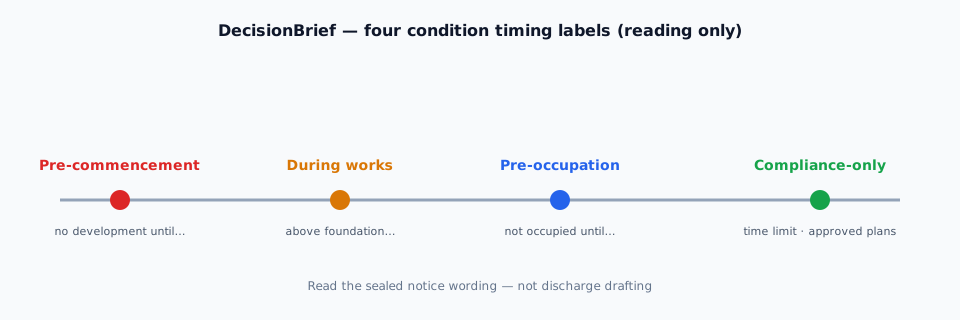
You paste the public URL of a named UK planning decision notice. We send a PDF in 24 hours that states the permission in plain English, lists every numbered condition we can source, classifies each as pre-commencement, during works, pre-occupation, or compliance-only, and cites the council wording so you can see the trigger. Neighbour personal names are redacted. If we can only open a report and minutes, the PDF says so. If the notice is thin — one-page "Approved" with no schedule — the PDF says so. If we cannot read a public decision, we refund. We do not invent a notice we have not seen.
What it is not
- Not planning advice. We do not say whether the permission is implementable, lawful, or a good idea.
- Not discharge drafting. We do not write the WSI, LEMP, CEMP, biodiversity gain plan, or waste strategy.
- Not a register fix. We read public papers. If the register is broken or paywalled beyond the report, we refund.
- Not a search engine. You already have the notice; we read the one you send.
Order a £79 sourced reading See the York sample first
Related guides
- Decision notice vs officer report — which document binds.
- How to read condition timing — four labels with York wording patterns.
- Informatives vs numbered conditions — unnumbered notes are not extra conditions.
Questions
What if the decision-notice PDF will not open from the public register?
Read what you can open: the officer report, committee minutes, and any other published papers. Do not treat the report as the issued wording. The officer report recommends; the minutes record the vote; the sealed notice binds. DecisionBrief will cite the papers we could open and stamp the gap. If we cannot read a public decision, we refund. We do not invent a notice we have not seen.
What is a thin notice?
A thin notice is a decision PDF that says "Approved" or "Permission granted" but does not reprint the full conditions schedule. Some registers post a one-page grant with the detailed schedule in a separate "Conditions" document; others list conditions only in the committee report. A thin notice on the register does not mean the permission has no conditions — it means the sealed schedule may live elsewhere on the file or may not be published yet.
Can I programme from the officer report if the sealed notice is missing?
The officer report is a recommendation. Committee can amend it, and officers can change wording between report and issue. Until you have the sealed decision notice, you do not have the issued wording. DecisionBrief's York Hempland sample is the worked example: report and minutes open; sealed PDF did not. The sample cites what we could open and says if the sealed notice later differs, the sealed notice wins.
What if the register entry lists "Decision Notice" but the link is broken?
Contact the local planning authority and ask for a copy of the sealed notice. Many authorities will email or post a copy if the online register is broken. Do not start on site from the report alone. If DecisionBrief cannot open the sealed notice or a working alternative, we refund.
Does a thin notice mean the permission has no conditions?
No. A thin notice on the register usually means the full schedule is in a separate document, in the report, or not yet published. The grant may still be "subject to conditions" — you just cannot see them on the one-page notice. Search the register for linked "Conditions" or "Schedule" documents, and contact the authority if none appear.
Is this planning advice?
No. This guide and the £79 PDF are sourced readings of public notices. The council's decision notice remains the legal document. If you need advice, instruct a planning consultant or solicitor.
Will you write the discharge applications?
No. We classify the conditions we can source and cite the wording. We do not prepare or lodge an application for approval of details reserved by condition.
Who runs DecisionBrief?
Ellis Greensitt, sole trader, trading as DecisionBrief. English law. See terms and privacy. Email hello@decisionbrief.co.uk. No telephone.
Sources cited on this page: GOV.UK — Determining a planning application (paragraphs 019–021, 024); DecisionBrief sample for City of York 25/01211/FUL, 45 Hempland Lane (committee report and minutes as published; sealed decision-notice PDF on Idox register could not be opened from the desk that wrote the sample). Last reviewed 9 September 2026. DecisionBrief is not City of York Council and is not the Planning Portal.